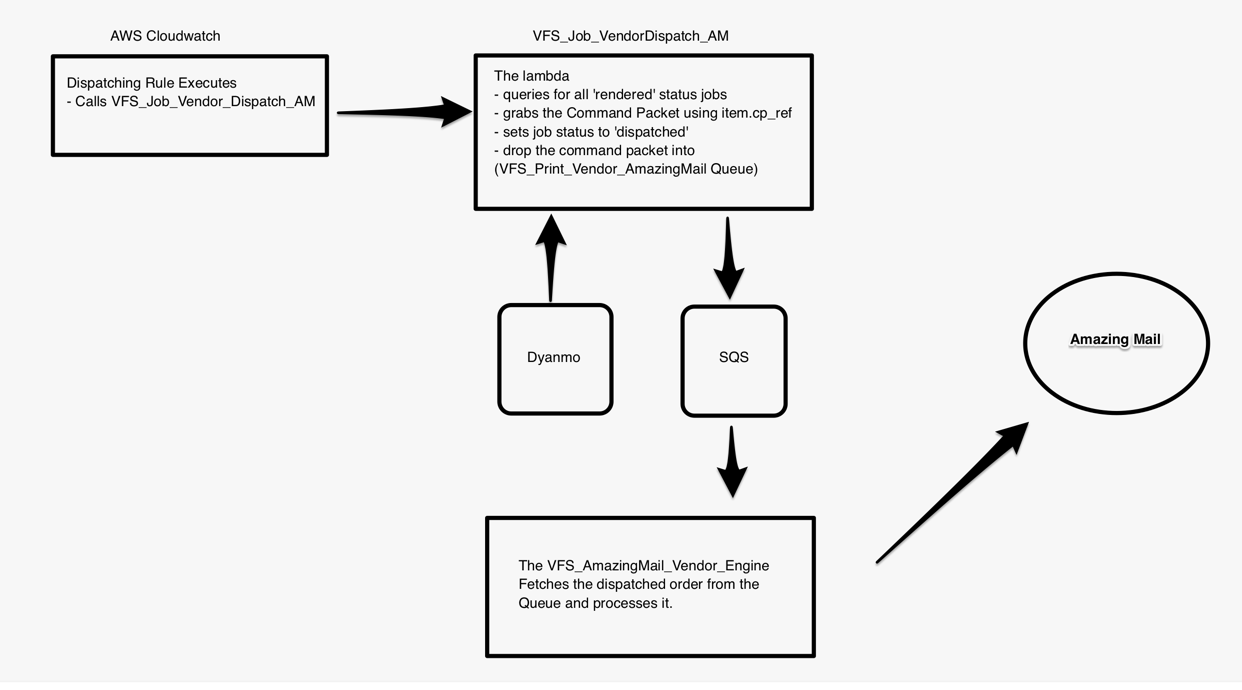
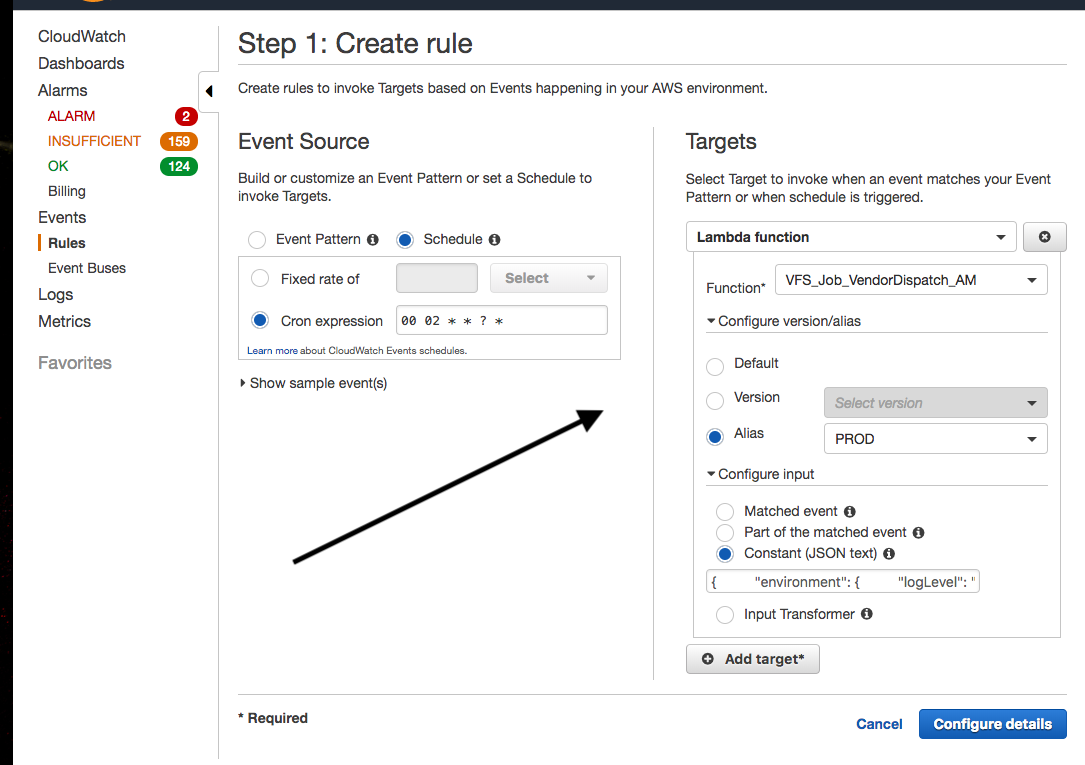
Every evening, the VFS Print Dispatching System executes. It is looking for any job in a 'Rendered' status and gathers them up and submits them to the Vendor Engine for processing. After dispatching, the job gets set to 'Dispatched' status. When the job is on its way to Amazing Mail, the status is set to 'Sending'. This is how it works.
Edit me
Admin Web
To query jobs to be dispatched:
- Select ‘Velma’ from the Sponsor filter drop down (if not already selected)
- Select ‘Rendered’ from the Status filter drop down
- Date Filter - select Custom Range and look back a few days
To query jobs that are currently being re-queued or in a dispatched state.
- Select ‘Velma’ from the Sponsor filter drop down (if not already selected)
- Select ‘Dispatched’ from the Status filter drop down
- Date Filter - select Custom Range and look back a few days
- Anything in a dispatched state is currently going through processing to print Vendor.
To query jobs that are currently being sent to Amazing Mail:
- Select ‘Velma’ from the Sponsor filter drop down (if not already selected)
-
- Select ‘Sending’ from the Status filter drop down
- Date Filter - select Custom Range and look back a few days
Detailed Workflow
Technologies
Figure 1
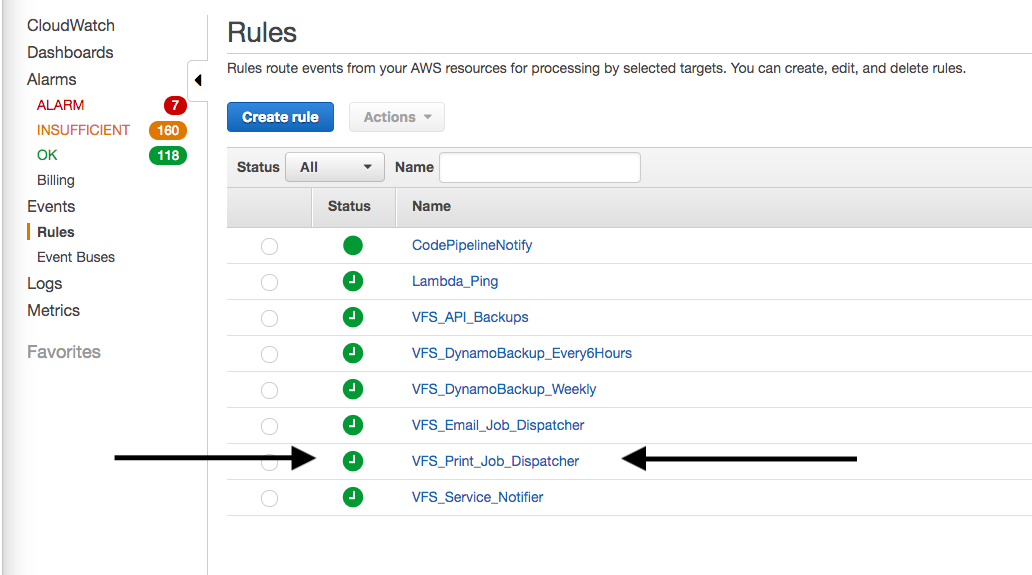
Figure 2
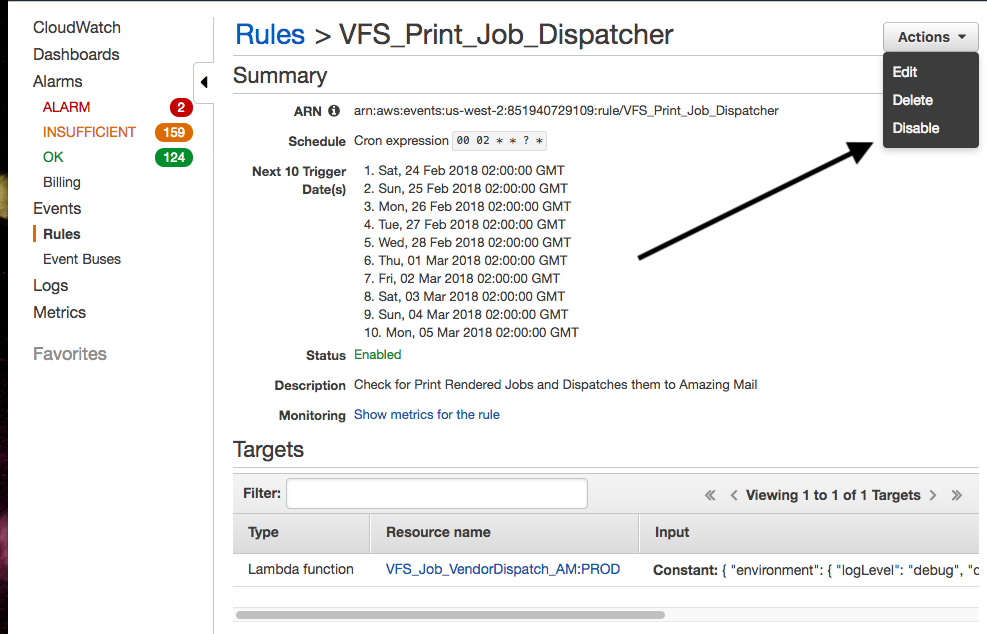
Figure 3
AWS Lambda (VFS_Job_VendorDispatch_AM)
- This lambda does the following:
- Queries Dynamo for jobs in a ‘Rendered’ status
- Once it gathers a list of those jobs, it iterates through them one by one doing the following:
- For each job, it gets the job’s command packet using the Dynamo item.cp_ref property
- It then dispatches that job
- Dispatching Means:
- Set the job status to ‘Dispatched’
- Drop the command packet in the SQS (VFS_Print_Vendor_AmazingMail) Queue
- Dispatching Means:
- The Amazing Mail Vendor Engine reads from that Queue
VFS Amazing Mail Vendor Engine
- The engine does the following:
- Polls the VFS_Print_Vendor_AmazingMail Queue for jobs
- Grabs a job in the form of a command packet (Also called a task) and starts to process it
- Checks throttling logic (Explained below)
- Submits the job to Amazing Mail for printing
Throttling Explained
- Due to VFS submitting jobs to Amazing Mail too fast we had to implement throttling
- How throttling works (it is based on a few values):
- Throttling Interval
- Throttle a job for ‘X’ seconds
- Current Value = 60 Seconds
- Located in the Engine Code (Private const THROTTLE_INTERVAL)
- Throttling Limit
- Only send ‘X’ at a time to the vendor Amazing Mail
- Current Value = 5
- Located in ETCD (etcdctl get /config/services/VFS.Engines/Vendor/throttleLimit/amazingmail)
- Re-queueing Delay
- A calculated value indicating a delay for dropping the job back in the queue
- So a job gets dropped back into the queue but doesn’t show up for X seconds
- Current Value = 60 seconds
- Located in Vendor Engine Vendor Service isOverLimit function
- Throttling Interval
- The simple explanation is:
- Throttling allows us to only 5 jobs every 60 seconds to Amazing Mail
- A list of jobs to be sent is created in REDIS and that list is check by the Vendor Engine
- If the next job makes the list of of jobs bigger than 5 within 60 seconds that job will be re-queued
- There is a 60 second delay on the re-queue
- So if we have a 1000 jobs to send - at the throttled rate of 5 jobs per 60 seconds then it will take 3 hours to send those (UGGH)
- The detailed explanation is:
- The Vendor Engine keeps a list (REDIS) of the last few jobs sorted by the dispatched date
- List:
- Job 1: 2017-01-01:6:00 PM - Will last 60 Secs
- Job 1: 2017-01-01:6:03 PM - Will last 60 Secs
- Job 1: 2017-01-01:6:05 PM - Will last 60 Secs
- List:
- If the number of items in the list is > the 5 jobs / 60 secs the job will be re-queued with a 60 second delay
- If the number of items in the list is < the 5 jobs / 60 secs the job is added to the list and dispatched
- The size of the list will grow each time a job is dispatched and shrink each time a record in the list expires
- The expiry time is 60 seconds (each redis record will go away in 60 secs)
- The number of jobs Amazing Mail can handle is 5 / 60 Secs
- Therefore if there is a batch of 1000
- VFS will send 5 every minute
- It will take 3 hrs to process all 1000 jobs
- The Vendor Engine keeps a list (REDIS) of the last few jobs sorted by the dispatched date